

Film scoring projects give students a chance to compose music that reacts to what’s happening on screen. It’s a practical way to explore composition, sound design and music technology while working on a creative project.
To get started, you just need the right video clips. Below are several places where you can find free and legal videos that work well for film scoring projects.
Looking for a complete film scoring project you can run with students? Inside the Midnight Music Membership you’ll find step-by-step projects and ready-to-use templates for film scoring activities.
1. Blender Open Movies: Best Free Animated Clips
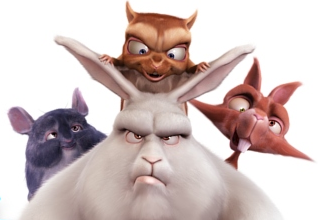
Blender Open Movies – created to showcase the Blender 3D graphics software – have been a go-to source for film scoring clips for many years of running workshops and online courses.
The films are released under a Creative Commons Attribution licence, which allows them to be shared and adapted as long as the creators are credited.
One of the most useful options is Big Buck Bunny, a 10-minute animated film that can easily be edited into several short clips for scoring projects.
Another great option is the Caminandes series, three short animations featuring Koro the llama. Each film is only a couple of minutes long, but they can still be edited into shorter bite-sized clips for student projects.
You can download the films here:
A playlist of most of the Blender Open Movies is also available on YouTube.
2. Marika Schanz Scoring Clips: Short Films for Film Scoring Practice
Composer Marika Schanz has created a collection of short 3D films specifically intended for film scoring practice. The clips cover a range of styles and moods, making them a great option for classroom projects.
There are currently seven clips available, including titles such as The Clock, Cyber Human and Beyond Wonderland. Each clip provides enough visual interest to inspire musical ideas while still being short enough to work well for student scoring projects.
You can browse and download the clips directly from Marika Schanz’s website.
3. Internet Archive: Large Library of Public Domain Film Clips
The Internet Archive hosts a large collection of public domain films that can work well for film scoring projects. The Moving Image Archive includes thousands of videos, ranging from vintage cartoons to historical footage and educational films.
Within the archive, there are several useful collections to explore, including:
- Prelinger Archives: Historical and educational films (best previewed by the teacher first)
- Film Chest Vintage Cartoons: Includes characters such as Popeye, Superman and Betty Boop
- Vintage Cartoons Collection: Features classics like Merrie Melodies
- NASA footage: Includes space launch videos that can make an exciting scoring project
Because the archive is so large, it’s best to browse and select suitable clips ahead of time before sharing them with students.
4. Pexels and Pixabay: Stock Video Clips
Another option is to use free stock video clips. These websites host short clips of landscapes, animals, city scenes, cars, oceans and many other topics that can work well for film scoring projects.
Two reliable places to explore are:
Most clips are quite short, so it can be useful to select two or three related clips and combine them in video editing software to create a slightly longer scene for students to score. A bonus is that many of these clips are already silent, which makes them ready to use straight away.
5. Create Your Own Clips
Another easy option is to create your own video clips. Recording short scenes can be a great way to generate material for film scoring projects and can even become part of the assignment itself.
Simple clips work best. After recording, edit the footage down to around a minute or less so students have a manageable scene to score. This can also be a great cross-curricular opportunity if you collaborate with your school’s media or film teacher.
Tips for Preparing Film Clips for Film Scoring Projects
Once you’ve chosen your video clips, a little preparation can make the film scoring project run much more smoothly.
Here are a few simple tips that can help when setting things up for students:
Remove Existing Audio from Video Clips
Some videos already include a soundtrack. If that’s the case, you can easily remove it before using the clip for a film scoring project.
Import the video into video editing software (Clipchamp is a simple free option, but most editors will work), then detach the audio from the video track. Once the audio is separated, you can mute or delete it and export the clip as a silent video ready for students to score.
Use Short Clips
Short clips work best for film scoring activities. Around 15 seconds is enough for beginners, while 60–90 seconds provides more scope for a longer composition project.
Download and Preview Clips Before Class
It’s best to download and review clips ahead of time. This helps ensure the content is suitable for students and makes the project run more smoothly in class.


17 Comments
Your site was extremely interesting, especially since I was searching for thoughts on this subject last Thursday.
[…] Projects Posted on February 7th, 2011 in Creative Commons, Film scoring, Free, Music Tech Tips. In a previous post I listed some useful places to find film footage for film scoring and video editing projects. This […]
I’m a composer new to the scoring scene. That being said, this site was extremely helpful in finding film I can use to assemble my demo reel.
Thanks!
Thanks Tyler – glad you found it useful!
This is all great, but how do you actually take the music of out the already mixed film and leave the actor’s voices and sound-effects in. It makes it hard scoring anything, if there is no dialogue to float on the score. Then it merely is a movie silent picture with your music. I’m having a hard time finding a method to do this.
Hi Ben,
There is no good way to do that. One option is to have the students re-create the dialogue and sound effects themselves (that’s a great project just on its own!). Other than that, you can choose a film where there is no dialogue in the first place, or choose something that has dialogue but no existing music soundtrack.
Since I wrote this blog post, I’ve been suggesting the Wallace and Gromit videos on this page. The BBC made them available for a film scoring competition that they ran a few years ago. They were awesome enough to provide exactly what you’re after – the scene with dialogue, but with the music removed so that students can composer their own. Hopefully you find them helpful.
Yes you can do that by using a few comments in unit as following:
-x, –extract-audio: Convert video files to audio-only files(requires ffmpeg or avconv and ffprobe or avprobe)
–audio-format FORMAT: Specify audio format: “best”, “aac”, “vorbis”, “mp3”, “m4a”, “opus”, or “wav”; “best” by default
–audio-quality QUALITY:Specify ffmpeg/avconv audio quality, insert a value between 0 (better) and 9 (worse) for VBR or a specific bitrate like 128K (default 5)
–recode-video FORMAT: Encode the video to another format if necessary (currently supported mp4|flv|ogg|webm|mkv|avi)
Dear Katie, I am looking for a composer to score “The Story of Icilla, an iceberg who didn’t want to leave her glacier”. I have photographed extensively in the Arctic and have shot clay animations that I am in the process of compositing into the Arctic footage. This work is largely self-funded, but will be part of an art exhibition in NYC opening in Jan 18. I remember hearing of a site where budding film score composers will work for free or reduced rate. Any contacts would be much appreciated. Thank you for the service that you provide!
Cheer, Itty
http://www.ittyneuhaus.com
Hello Itty – sorry but I don’t know of a site like that. You might like to try contacting some of the tertiary institutions in your area that offer film making courses and degrees. There might be a student who is wanting to gain some experience in that area. Good luck with the project!
Hello Itty, I know it’s after 2 and a half years but did you get someone to score this project of yours?
I’m not sure if you’d be still interested but I’m looking for something like this, i.e. an art project that I could try and do background score on, solely on a feedback basis no cost involved.
Let me know if this is still relevant.
-Jitin
Can I use these films as video for music MP3s with a view to getting a music video onto the ABC’s Rage program ?
Yes I would assume so – as long as you’re double-checking they are not restricted in any way. If they are public domain, then it’s no problem. Creative Commons licences vary so you need to check those ones.
Thanks, great resources for video, I’ve been scoring to some of these. It’s hard to find a great dramatic scene without existing music to add new score to but if you get creative you can surely find some interesting things to add music to. A lot of these old videos have a really cool vibe and some are just really amusing, adding contemporary music can give a quirky artistic interpretation.
Agree totally!
Note, music in a public domain film is not in public domain most likely!
Hello Katie,
Your post is awesome for creating videos for scoring projects. Here are some most useful sites to find videos for film scoring. https://www.topstik.com/buy-tiktok-video-views
[…] a previous post I listed some useful places to find film footage for film scoring and video editing projects. This […]