Gmail for Music Teachers: How You Can Stay Organized When Your Inbox is Overflowing

Gmail for Music Teachers: How You Can Stay Organized When Your Inbox is Overflowing

This is a guest post by one of our blog writers, Sarah Joncas.

Now more than ever, email is an important way to communicate. Whether it’s the latest deals, keeping up with friends or work-related communication, my inboxes always seem to be full of messages! With so many messages coming in, organization is key. I may not have time to read every message in detail every day, so I use systems that make it easy for me to deal with my most important messages first. Today I’ll share some of those systems with you.

Like many teachers, my school uses Gmail within our own domain. This means my school email doesn’t end with @gmail, but I can log in on the Gmail site. 

All of these tricks work in GMail both within your own school domain, if you have one, and in regular Gmail accounts, so independent teachers and those who use Gmail for personal use can also use these tricks to get organized!

One of the nice features of Gmail is plenty of space to save every email that crosses your inbox, but it quickly gets overwhelming to dig through thousands of messages. I use a system to sort my school communications within Gmail, and it can help you keep your email inbox organized too! Let’s get started with some Gmail organizational tools.

Our Top Search Tricks for Gmail

Sometimes, you just need to find a message fast. You might not know where you put it or what the exact subject line is, but you need to find it now. There are lots of search tricks for Gmail which can help. It’s no surprise that Gmail, a Google product, has search possibilities that make it very powerful. 

My favorite way to search for a message is by sender. If you start typing a name, you’ll see different senders from your inbox and you can select the one whose messages you’d like to see. For example, I send myself some emails from my personal Gmail to my school Gmail, so I can search for my own name and select my email.

Gmail search by sender

This will show me all the messages from that email. Sometimes you might know the domain (site) that a message came from, but not the specific email address that sent it. In this case, you can just type the @ symbol and then the domain. To see all of my Midnight Music emails, I can type @midnightmusic.com in the search box.

Gmail search box

You can also search by keyword. If you need an email about band, just search for band and all emails with band in them will pop up. Just like with Google, you can use “and” to indicate both terms are needed (band and beginning will give you results that have both words) and “or” to indicate one of the terms is needed (band or orchestra will give results that have either band or orchestra).

You can also combine the different types of search. For example, if I know I need an email from my principal about schedules, I can search for principal@school.org schedules. This makes it easier to find messages quickly, especially if you get a lot of emails from a particular contact. 

When you’re seeking to organize for the long term, Starring and Labels can help.

Starring: Important messages in one place

One of the most useful Gmail features that a lot of people don’t know about is the ability to “star” emails. Click the star next to a message and it will turn yellow:

Gmail star important messages

Then, in addition to appearing in your inbox, the message appears under “Starred” when you click it in the menu.
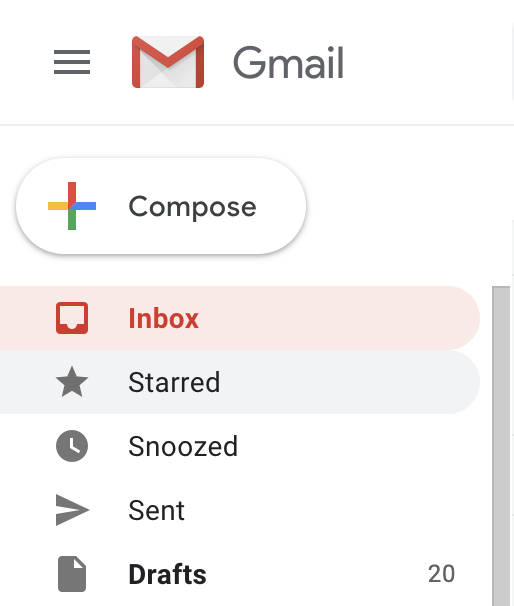
Gmail starred messages

Personally, I use starring for 2 purposes: emails that need action and emails that are important. For example, I frequently star messages with meeting agendas until the meeting happens so that I can easily pull up the email to reference at the meeting. I also star emails that need a reply which requires research, like if I’m asked for instrument recommendations. 

The key to keeping the Starred feature useful is clearing out your stars on occasion. Not every message is important forever! To unstar a message, just click the yellow star again and the star will be removed. The message will still be present in its original location. 

Some messages may need to be sorted on a more detailed level than simply important or not. That’s what we can use labels for.

Labels: Sorting What’s What

Gmail uses labels as a means of organizing messages. In my school email, I have labels for different types of communication. For example, all marketing emails get labelled “Marketing” and I only bother looking at them if I know I need to make a purchase. 

I label emails from parents based on the class that their student is in. This helps me reference emails later if need be, and makes it easy to give the correct answers to the correct people. 

In addition to labelling these emails, I use labels to organize emails that function as alerts for other systems, like Google Drive, Google Classroom, and our school’s payment processor. I do keep these emails as a reference just in case, but they’re neatly tucked away where I don’t have to look at them. 

Emails can be labelled manually. To label an email, click the label tag at the top of the email message and select which labels you’d like to give the message from the menu.

Gmail menu bar

However, filters are a real help in labelling emails automatically, so that they’re sorted before you even lay eyes on them! 

Filters: Sort Smart

Filters let you sort smarter – Gmail can sort your emails for you before you even open them! For me, filters help me to prioritize which emails I spend time with. Before I start a filter, I always create the label that I want to filter into – let’s make a Midnight Music label and have all emails from Midnight Music filter in there.

To create a filter, go to the settings menu by clicking the gear icon. 

Gmail search gear icon

Select “Settings” on the menu that pops up. 
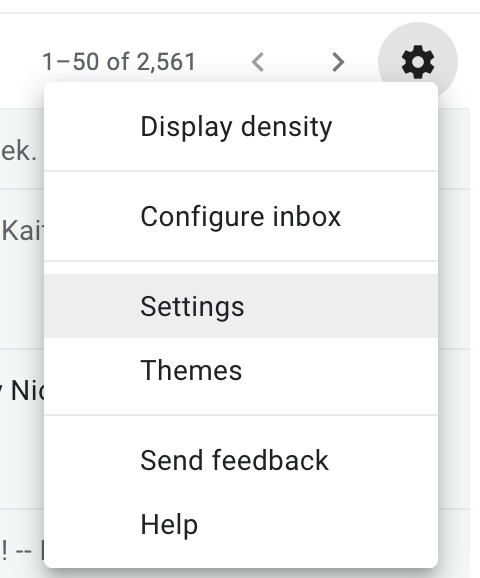
Gmail Settings menu

Select the “Filters and Blocked Addresses” tab.

Gmail settings options

Click “Create a New Filter”.

Gmail create a new filter

What pops up is basically an advanced search window.
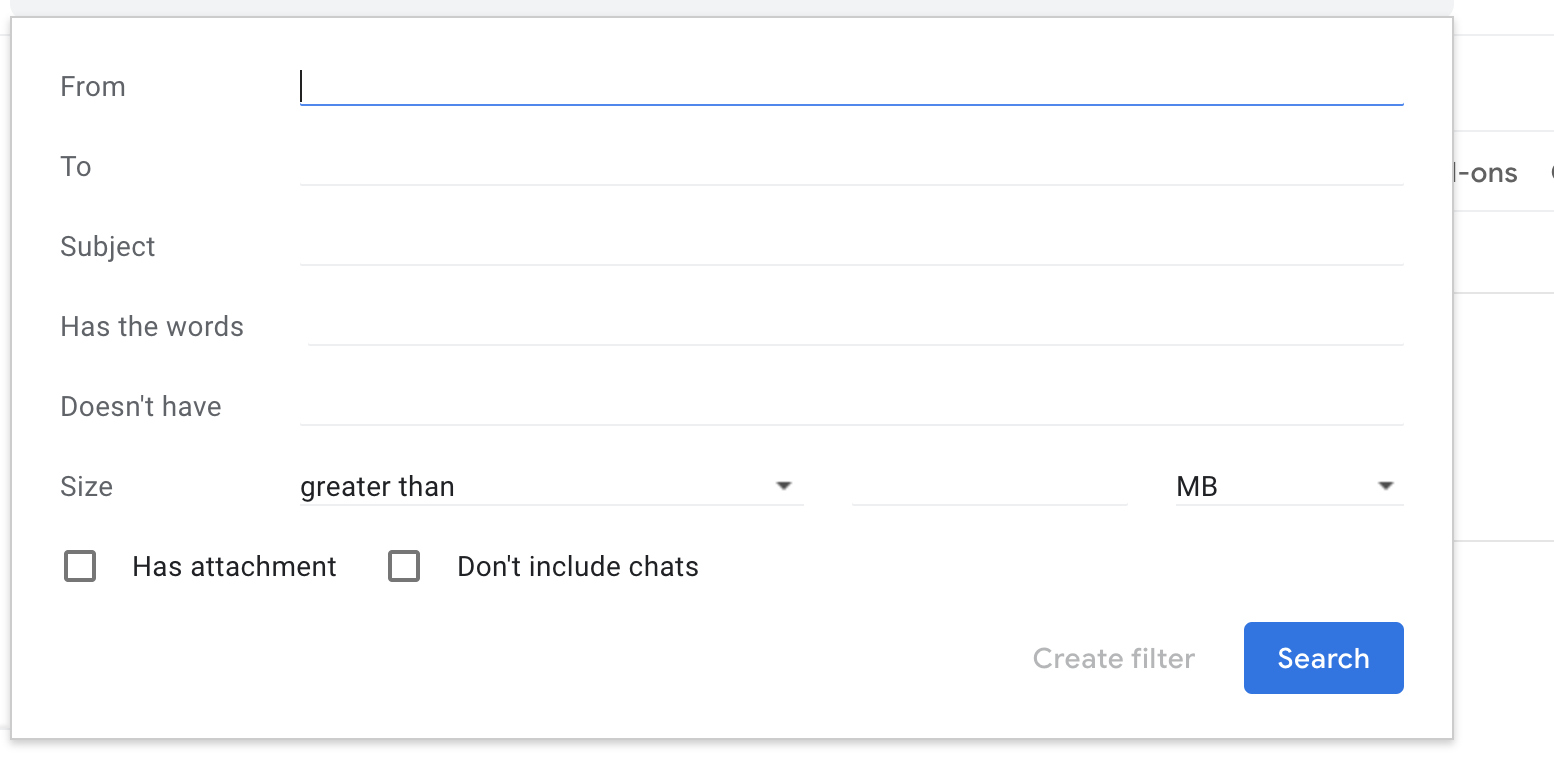
Gmail advanced search window

I’ll put in my parameters (in this case, I want to filter all messages from @midnightmusic.com, so I’ll type that in the from box). Then click “Create filter”
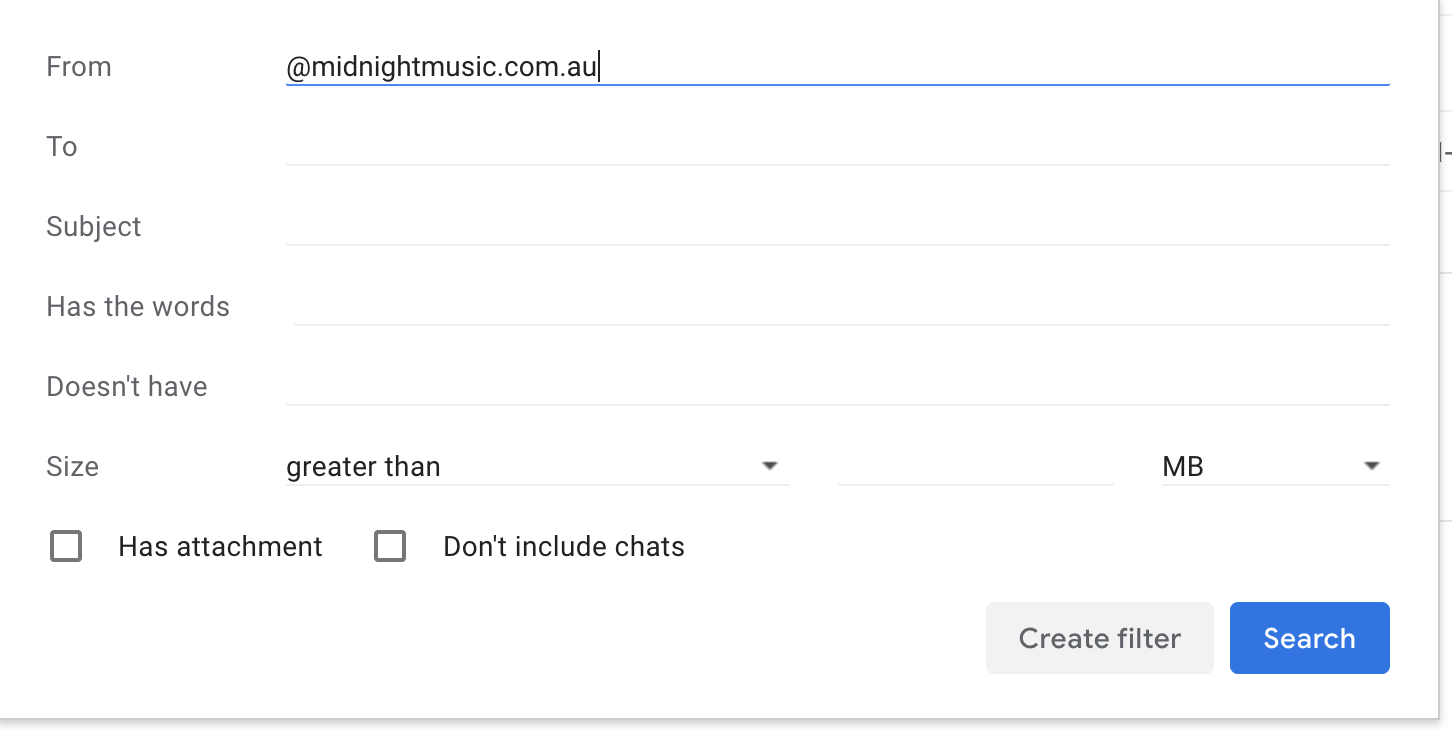
Gmail advanced search window

I select the “Apply the label” box and pick which label I’d like to apply.
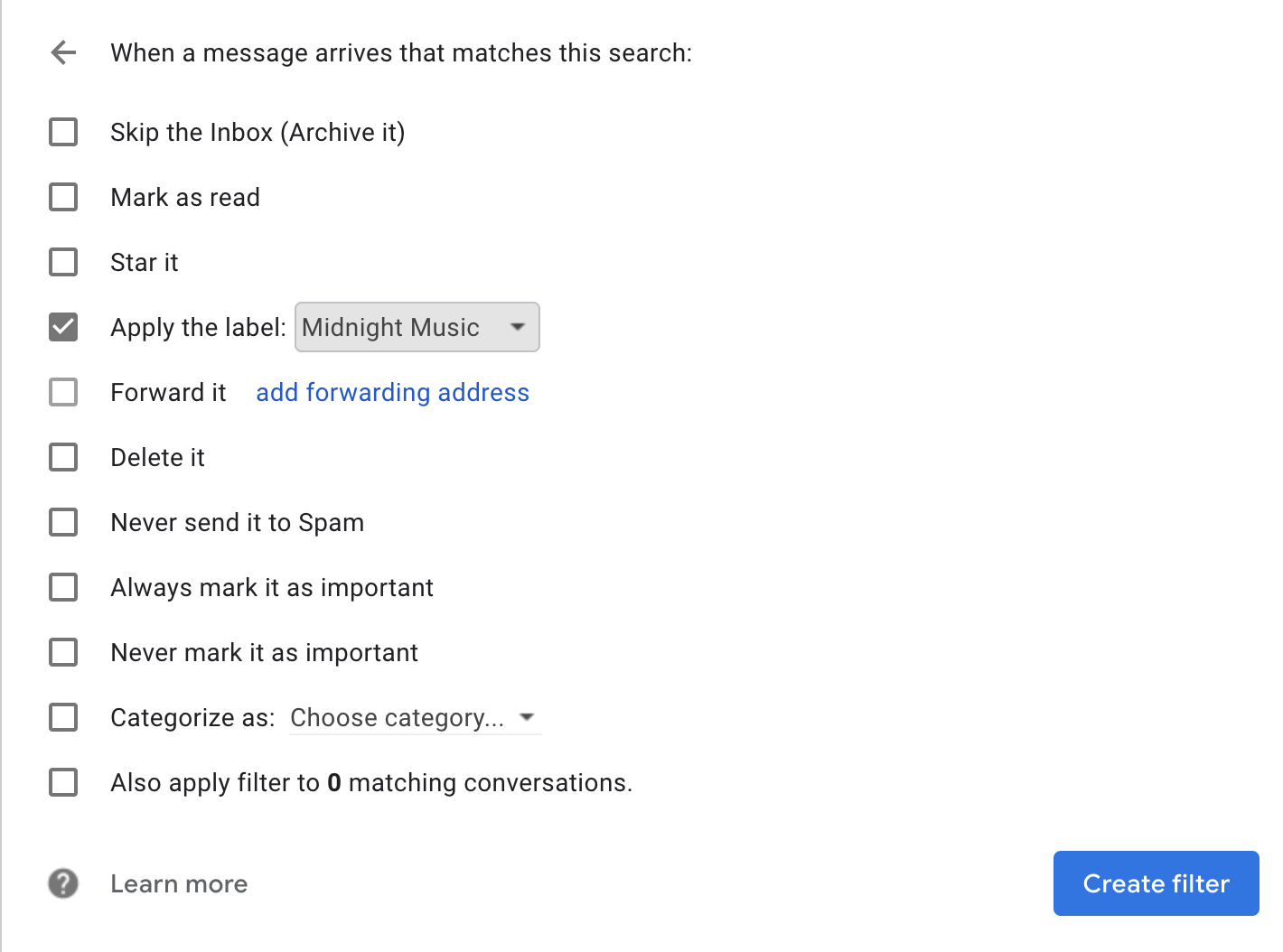
Gmail create a search filter

Then, click “Create filter” and you’re done! 

Conclusion

You’ll notice this article doesn’t tell you which labels to use, or how to sort your emails. One thing I’ve learned is that all teachers work differently, and need to use their own organizational systems to thrive. There isn’t a magic wand to wave for instant organization (I wish!) that’s actually useful. I hope you can find labels that work for you in your unique situation, and you have some new strategies to cope with inbox overwhelm in Gmail. 

Gmail’s tools can be a great help to music teachers in the quest to be organized. I hope you’ll try some of them out for yourself!

Download your copy

Would you like to take a copy of this with you? Click the button below and a copy of this will be sent directly into your inbox.

About the Writer

Sarah Joncas is a music teacher from Massachusetts, USA. She teaches kindergarten through fifth grade general music, fifth grade chorus, fifth grade band, and percussion ensemble. Before becoming a teacher, she worked with technology and educational software.

In 2014, she was named a TI:ME Technology in Music Education Leadership Fellow, which allowed her to attend a music education conference in Texas and explore cutting edge music teaching technology. She has earned degrees in Music Education from the University of Massachusetts Amherst and Boston University. You can connect with Sarah on Twitter or her blog Teaching Music Musings

Looking for More Resources for Music Teachers?

Hello! I’m Katie Argyle – an Australian music technology trainer and consultant with a passion for helping music teachers through my business Midnight Music.

I’m a qualified teacher but no, I don’t currently teach in a school. I help teachers through my online professional development space – the Midnight Music Community – where there are tutorial videos, courses, links and downloadable resources.

MMC Mockup new

I like to focus on easy ways to incorporate technology into what you are already doing in your music curriculum through a range of creative projects. I also run live workshops and have presented at countless conferences and other music education events.

If you want simple, effective ideas for using technology in music education, I would LOVE to help you inside the Midnight Music Community.

Learn more and take a sneak peek inside

2 Shares
Katie Argyle
Founder of Midnight Music

I’m Katie Argyle, founder of Midnight Music. I provide practical professional development that simplifies technology for music teachers, helping you teach with confidence and creativity using modern tools. I hold a Bachelor of Music (Education, Honours) from the University of Melbourne. With more than 15 years of experience, I’ve spoken at over 100 conferences and helped thousands of educators worldwide integrate technology into their teaching through my courses, workshops, and the Midnight Music Community.

Leave A Comment

You might also like...

Table of Contents

introducing the

MIDNIGHT MUSIC COMMUNITY

Your go-to hub for tech-focussed professional development: step-by-step training, online courses & creative lesson ideas especially for music teachers!

Desktop and laptop showing the 2025–2026 Ultimate Free Music Tech Resources Guide for teachers

download now!

THE ULTIMATE FREE MUSIC TECH RESOURCES GUIDE 2025-2026

Download our annual guide to 350+ of the best free tech resources, organized into 30 categories to help you supercharge your classroom.
It’s totally free. Get yours today.

Popular Courses

PRIVACY POLICY

This is the Privacy Policy for the Midnight Music website located at www.midnightmusic.com (“Site”).

The Site is operated by Midnight Music Pty Ltd ABN 87 619 652 603 (“Midnight Music” or “Company” or “we” or “us”).

Midnight Music understands the importance of protecting your personal information and undertakes to adhere to this privacy policy at all times to ensure your personal information is effectively safeguarded.

Information you provide to us

The Site provides various places for users to provide information. We collect information that users provide by filling out forms on the Site, communicating with us via contact forms, responding to surveys, search queries on our search feature, providing comments or other feedback, providing information when ordering a product or service via the Site, and other circumstances where collecting personal information is reasonable and permitted by the Laws of the State of Victoria, Australia.

We use information you provide to us to deliver the requested product and/or service, to improve our overall performance, and to provide you with offers, promotions, and information.

Information we collect through automatic data collection technology

As you navigate through the Site, we may use automatic data collection technologies including Google Analytics to collect certain information about your equipment, browsing actions, and patterns. This will generally include information about your location, your traffic pattern through our Site, and any communications between your computer and our Site. Among other things, we will collect data about the type of computer you use, your Internet connection, your IP address, your operating system, and your browser type.

The information we collect automatically is used for statistical data and will not include personal information. We use this data to improve our Site and our service offerings. To the extent that you voluntarily provide personal information to us, our systems will associate the automatically collected information with your personal information.

Use of cookies and pixels

Similar to other commercial websites, our Site utilises a standard technology called “cookies” and server logs to collect information about how our site is used. Information gathered through cookies and server logs may include the date and time of visits, the pages viewed, time spent at our site, and the websites visited just before and just after our own, as well as your IP address.

A cookie is a very small text document, which often includes an anonymous unique identifier. When you visit a website, that site’s computer asks your computer for permission to store this file in a part of your hard drive specifically designated for cookies. Each website can send its own cookie to your browser if your browser’s preferences allow it, but (to protect your privacy) your browser only permits a website to access the cookies it has already sent to you, not the cookies sent to you by other sites.

The Company reserves the right to use technological equivalents of cookies, including social media pixels. These pixels allow social media sites to track visitors to outside websites so as to tailor advertising messages users see while visiting that social media website. The Company reserves the right to use these pixels in compliance with the policies of the various social media sites.

Use of SMS

We collect mobile phone numbers to send SMS messages. By providing your mobile number, you consent to receive SMS communications from us regarding our products, services, and promotions. We will not share your mobile number with third parties. Message frequency may vary based on your interaction with us. Message and data rates may apply. You can opt-out of receiving SMS messages at any time by following the instructions provided in the message or by contacting us directly.

How we manage personal information

Midnight Music undertakes to take all commercially reasonable steps to ensure that all personal information collected by us is accurate, up-to-date, complete and stored securely. When your personal information is no longer required for the purposes which Midnight Music uses personal information, all commercially reasonable steps will be undertaken to securely destroy that information.

How your personal information will be used

We use personal information for purposes of presenting our Site and its contents to you, providing you with information, providing you with offers for products and services, providing you with information about your subscriptions and products, carrying out any contract between you and the Company, administering our business activities, providing customer service, and making available other items and services to our customers and prospective customers.
From time-to-time, we may use the information you provide to us to make you offers to purchase products and services provided by third parties in exchange for a commission to be paid to us by such third parties. Should you opt to take part in such promotions, the third parties will receive your information.

Disclosure of your information

Midnight Music considers personal information we collect about you to be confidential and will not disclose such information to third parties except in the following circumstances:

  • Where you have consented to your personal information being provided to a third party;
  • Where Midnight Music is required by law to disclose your information; and
  • Gaining access to your personal information held by Midnight Music

Except in circumstances where access to your personal information may be denied by the Privacy Act or other Law of the State of Victoria, Australia, your personal information will be provided to you upon request.

Visitors’ General Data Protection Regulation rights

If you are within the European Union, you are entitled to certain information and have certain rights under the General Data Protection Regulation (GDPR). These include the following:

  • We will retain the any information you choose to provide to us until: (a) you ask us to delete the information; (b) we decide to cease using our existing data providers; or (c) the Company decides that the value in retaining the data is outweighed by the costs of retaining it.
  • You have the right to request access to your data that the Company stores and the rights to either rectify or erase your personal data.
  • You have the right to seek restrictions on the processing of your data.
  • You have the right to object to the processing of your data and the right to the portability of your data.
  • To the extent that you provided consent to the Company’s processing of your personal data, you have the right to withdraw that consent at any time, without affecting the lawfulness of processing based upon consent that occurred prior to your withdrawal of consent.
  • You have the right to lodge a complaint with a supervisory authority that has jurisdiction over issues related to the General Data Protection Regulation.
  • We require only the information that is reasonably required to enter into a contract with you. We will not require you to provide consent for any unnecessary processing as a condition of entering into a contract with us.

Contact us

Should you have any queries in relation to the above or require further information regarding the Privacy Policy please contact us:

Midnight Music Pty Ltd
PO Box 219
Glen Waverley
Victoria 3150
AUSTRALIA

Email address: support@midnightmusic.com
