

Introduction
May The Fourth be with you!
Here’s a fun, free Star Wars music tech lesson you can use with your students.
This project uses the free Songmaker which is part of the Chrome Music Lab. It’s a simple, web-based tool that lets students click on a grid to create melodies and rhythms. Just press “Play” to hear their musical masterpiece come to life!
In this lesson, students will create their own version of the iconic Star Wars main theme by John Williams, using the Chrome Music Lab Songmaker.
Lesson Levels
There are multiple difficulty levels to suit different age groups and experience levels:
- Padawan I – Ideal for beginners and elementary students
- Padawan II – Another entry-level challenge for young learners
- Jedi Knight – Great for middle school students
- Jedi Master – Perfect for middle and high school or more advanced students
- Jedi Master II – For experienced students ready for an extra challenge
Choose the level that best fits your class or have students progress through all of them, from Padawan to Jedi Master II.
If you’d like more ready-to-use projects like this – complete with step-by-step instructions, lesson plans, live training, and ongoing tech support – you’ll find them all inside the Midnight Music Community.
How the lessons work
Teacher Guide and Slides
In the download below you will find links to:
- A Teacher Guide
- Slides that you can use in class with your students (3 options: Google Slides, Powerpoint and a PDF version)
The Teacher Guide includes a Teacher Notes section for each level where you’ll see a completed example version which is a reference for the teacher. Click on the link to see the example in Chrome Music Lab (then press play to hear it).
Think of this as an “answer key”, although your students may come up with acceptable variations on my completed example.
I have also noted what the students will create in that level – whether it’s a melody only, melody and bassline, rhythmic part etc and what settings are used. This is just for your information only, since students will start with a template file that has all the correct settings in place anyway.
Student template files and saving
I have set up a student template file for each level. The template gives them a starting point – the Settings are already in place and some of the melody and/or bassline is already included.
The template file is simply a link which you can send to your students.
Students will open the template file and then add notes to it to create their version of the Star Wars theme.
To save:
- Once they’ve finished, they will click Save
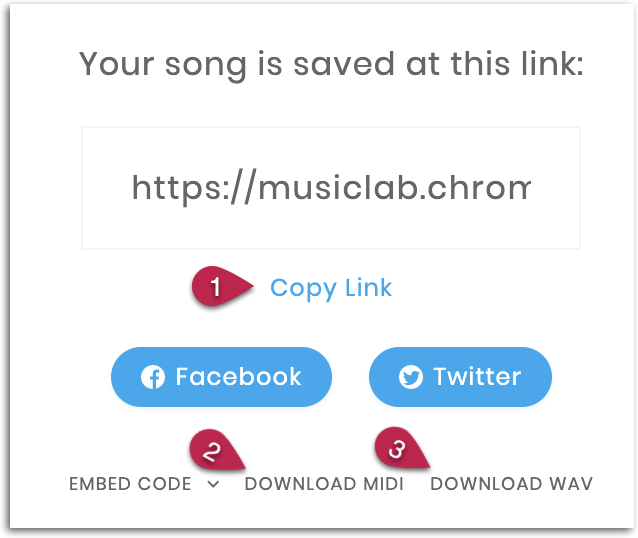
- On the next screen they can click Copy Link (1) and send that link to the teacher
- Additionally, there are options to download a WAV file (3) if they would like to keep an audio file version of their piece, or a MIDI file (2) which can be used in another software program like GarageBand, Soundtrap or Bandlab
NEW 2021: Choice Board Slides for students
I have created a presentation-style handout (preview below) that you can use with your student which is separate to this Teacher Information booklet.
Note that the first few pages of the handout are notes for the Teacher.
After that, there are Student pages.
I would suggest you do the following:
- Edit the student instructions (optional)
- Duplicate the entire presentation (make a copy)
- Keep the original version as your teacher copy
- In the second copy, delete the Teacher slides and rename this file Star Wars Student Copy
- Send the Student Copy to your students so they can complete the tasks

Level 1 – Padawan I & II
Teacher notes
- Completed example version for the teacher – Star Wars Main Theme
- This version involves melody plus percussion
- Settings: length 5 bars, scale major, split beats into 3, range 3 octaves
Padawan I student activities
- The main theme melody has been provided
- Students will fill in a percussion part and choose instrument playback sounds
- Send students this template link
- Once finished, click Save. On the next screen click Copy Link and then send the link to the teacher
Padawan II student activities
- The first part of the melody only is provided (plus the final note)
- Students will fill in the rest of the main theme melody
- Students will then fill in a percussion part and choose instrument playback sounds
- Send students this template link
- Once finished, click Save. On the next screen. click Copy Link and then send the link to the teacher
Level 2 – Jedi Knight
Teacher notes
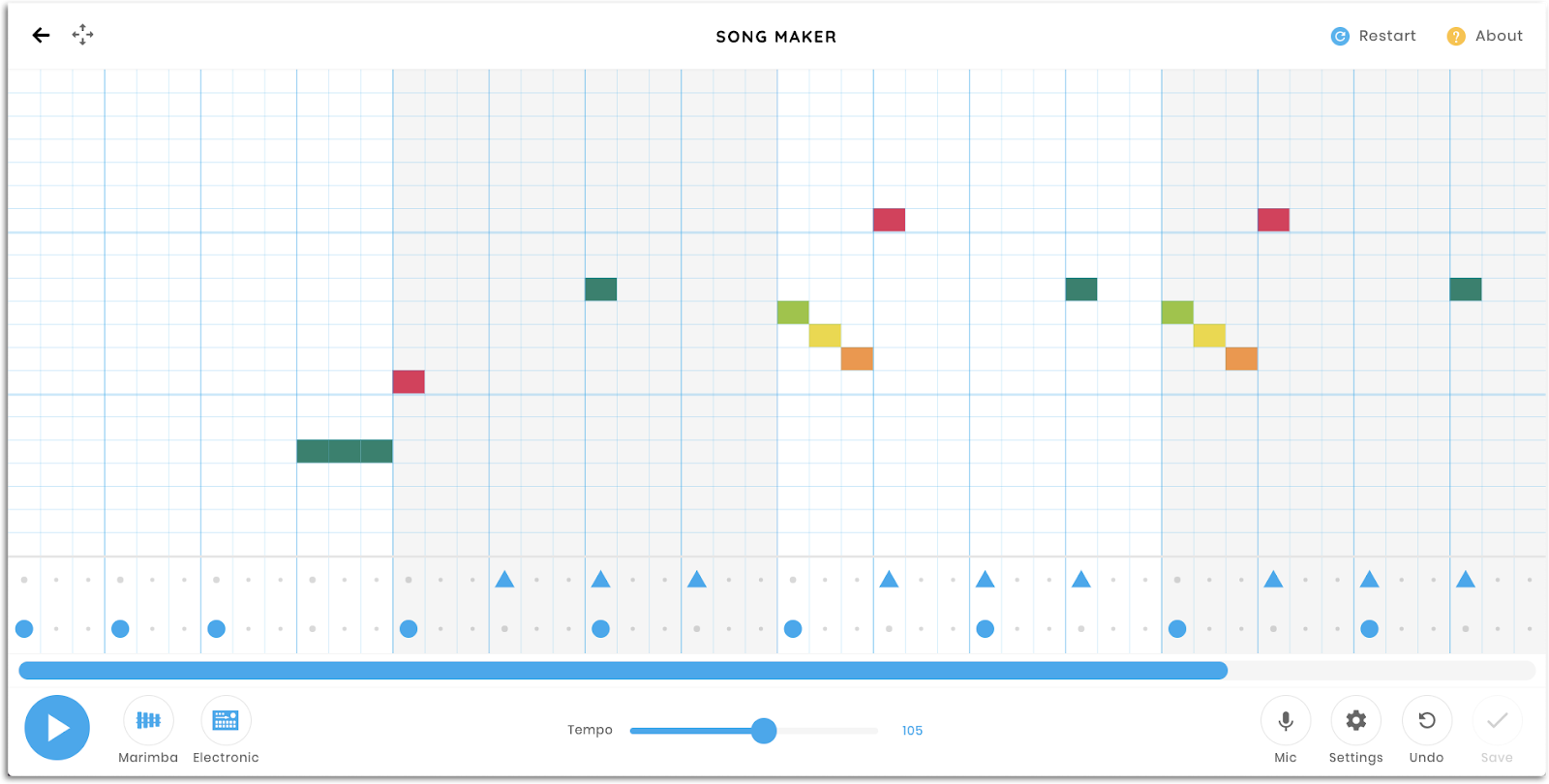
- Completed example version for the teacher – Star Wars Main Theme
- This version involves melody, bassline and percussion
- Settings: length 5 bars, scale major, split beats into 3, range 3 octaves
Jedi Knight student activities
- The first part of the melody and bassline are provided (plus the final note in each)
- Students will fill in the remainder of the melody AND a bassline, then add a percussion part and choose instrument playback sounds
- Send students this template link
- Once finished, click Save. On the next screen, click Copy Link and then send the link to the teacher
Level 3 – Jedi Master
Teacher notes
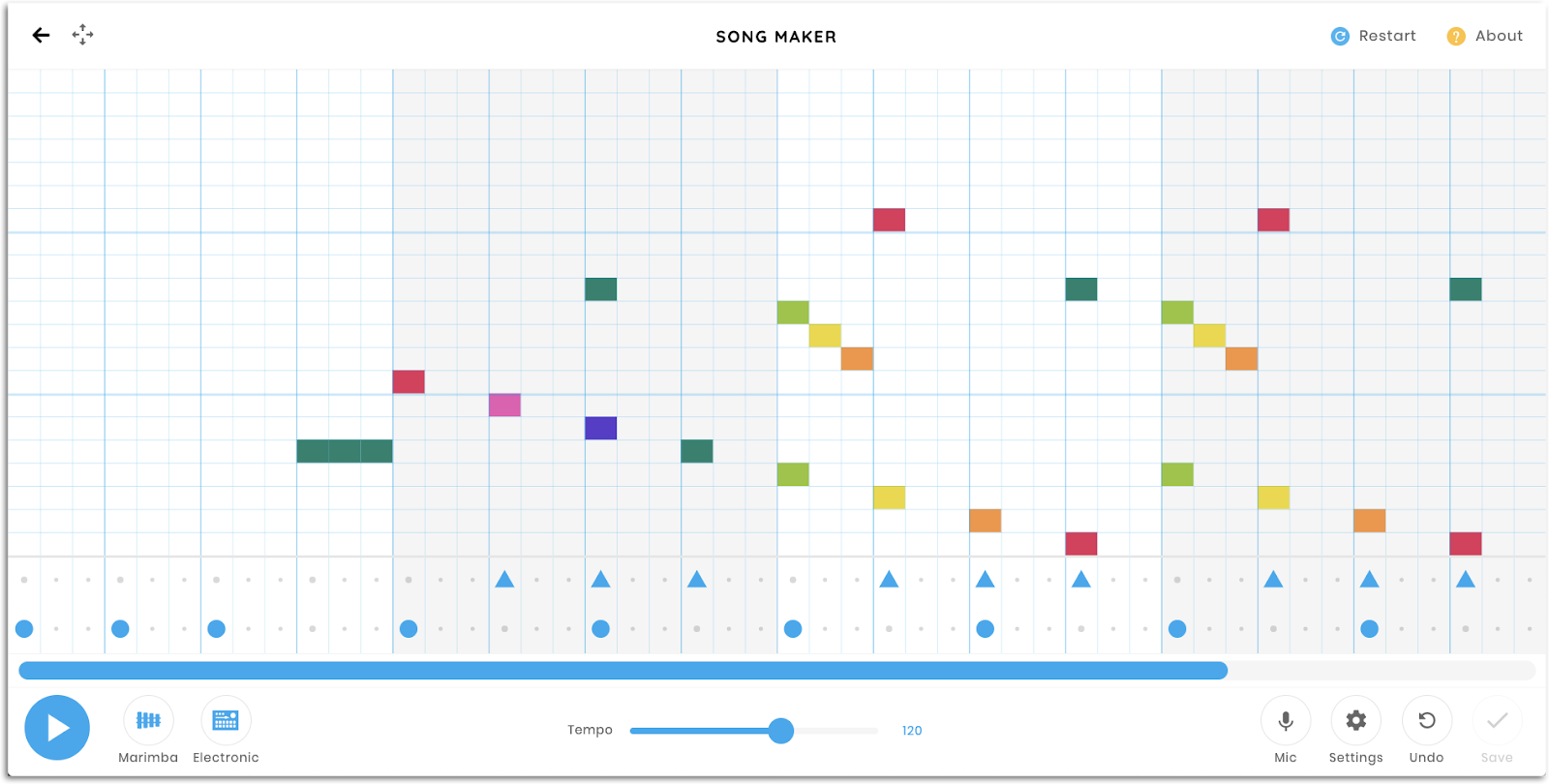
- Completed example version for the teacher – Star Wars Main Theme
- This version involves melody, bassline, chords, percussion and a chromatic scale setting (instead of a major scale setting)
- Settings: length 5 bars, scale chromatic, split beats into 3, range 3 octaves
Jedi Master student activities
- Only the first few notes of the melody and bassline are provided (plus the final note in each)
- Students will fill in the remainder of the melody, create a bassline, add chords and a percussion part and choose instrument playback sounds. They also have access to the notes of the full chromatic scale
- Send students this template link
- Once finished, click Save. On the next screen. click Copy Link and then send the link to the teacher
Level 4 – Jedi Master II [Imperial March]
Teacher notes
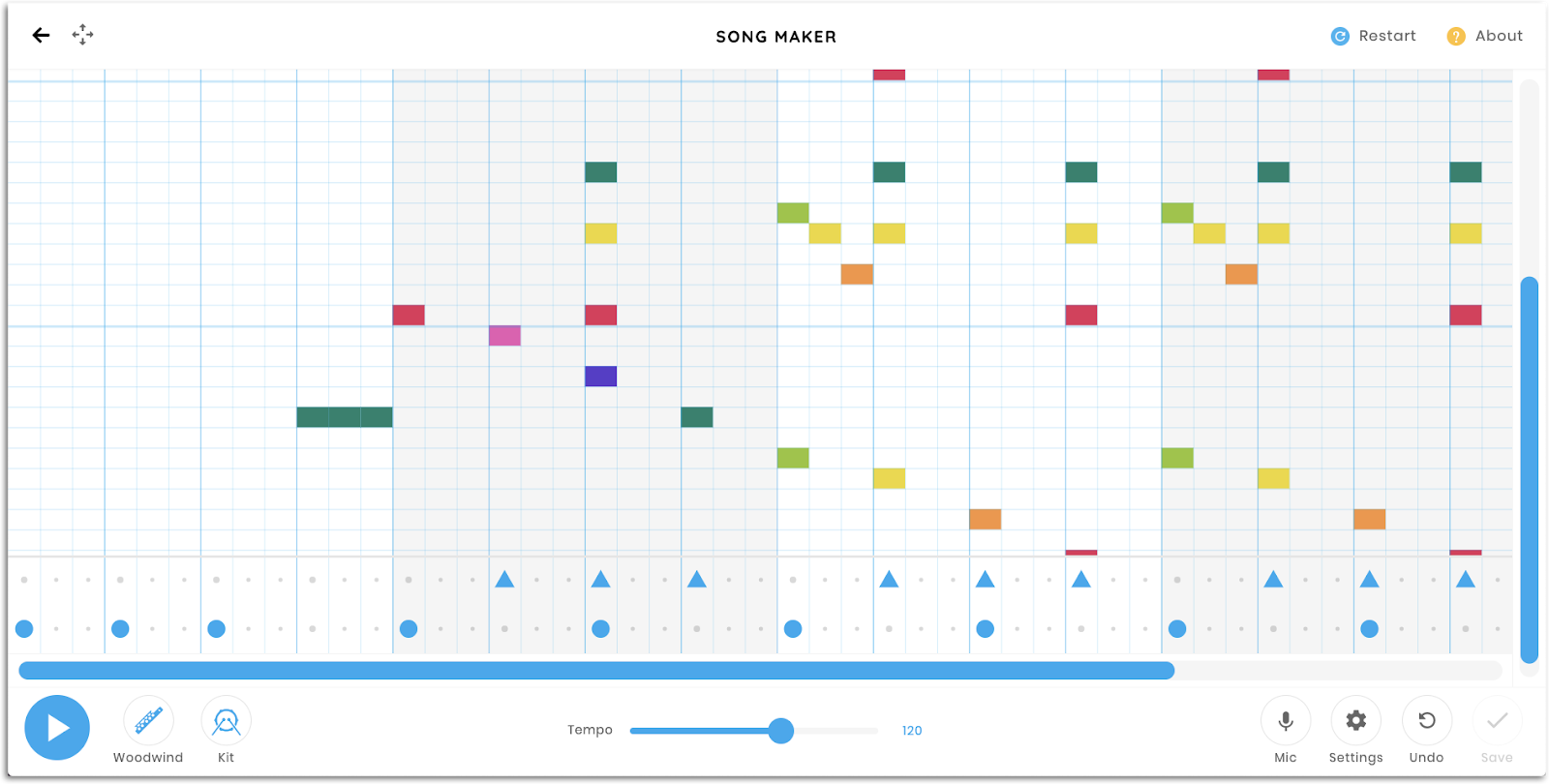
- Completed example version for the teacher – Imperial March
- This version involves melody, bassline, chords and percussion
- Settings: length 8 bars, scale chromatic, split beats into 4, range 3 octaves
Jedi Master II student activities
- The first few notes of the melody and bassline, plus the final measure are provided (includes a final chord)
- Students will fill in the remainder of the melody, add chords, create a bassline, add a percussion part and choose instrument playback sounds
- Send students this template link
- Once finished, click Save. On the next screen. click Copy Link and then send the link to the teacher

Download your copy
Would you like to take a copy of this with you? Click the button below and a copy of this will be sent directly into your inbox.
Looking for More Resources for Music Teachers?
Hello! I’m Katie Argyle – an Australian music technology trainer and consultant with a passion for helping music teachers through my business Midnight Music.
I’m a qualified teacher but no, I don’t currently teach in a school. I help teachers through my online professional development space – the Midnight Music Community – where there are tutorial videos, courses, links and downloadable resources.

I like to focus on easy ways to incorporate technology into what you are already doing in your music curriculum through a range of creative projects. I also run live workshops and have presented at countless conferences and other music education events.
If you want simple, effective ideas for using technology in music education, I would LOVE to help you inside the Midnight Music Community.





33 Comments
Just a big thank you for your generous sharing!
Thank YOU Diane!
Katie, you’re a legend. Thank you so much for sharing.
Thank you Mary!
Awesome thanks!
You’re welcome Sooz!
Thank you for sharing Katie
You’re welcome Adam 🙂
This is just so helpful Katie. Thank you so much
Do you have more resources like this? I must take a look at midnight music Thanks again. M
Hi Miriam – yes there are a number of other free resources throughout my blog (too many to list!) and then many more things available in my (paid) online community – including courses, lessons, videos and so on. There’s more information about that heremore information about that here.
These look cool! Can’t wait to try them out!! Thanks for your generous sharing.
Thanks Dixie!
Thank you for sharing this lesson. It gave me some new ideas to try with Chrome Music Lab.
You’re welcome Linda!
I cannot thank you enough for sharing these wonderful ideas. I have never used much of any technology in my music classroom so distance learning has been one of the greatest challenges in my 20 year career. Thank you for making this user friendly for the tech challenged.
Thank you for the lovely comment Carrie. It’s been a steep learning curve for many I think!
OMG! My kids are eating up this assignment! I have had many of them already turn it in and several that said they started as a Padawan and then moved up doing the higher levels. Thank you so much for this assignment and for all you do!
Thanks Robin – so good to hear!
Thank you so much for making this available! I’m excited to use this with my classes this week!
Thank you for your great help and inspiration! Greetings from Wiesbaden, Germany!
Thank you Klara!
Hello Katie,
I have just been recommended to visit your site. I have had some recent basic training using Flipgrid but was told that you have offered some excellent music specialist training. Will you be running any future courses about Flipgrid? Sadly, it appears I have just missed a recent opportunity.
Look forward to hearing from you.
Angela
Hi Angela – you can watch the replay of that webinar herethe replay of that webinar here. You’ve reminded me that we need to add it to our “Free training” page so thank you!
Thank you so much for your generosity Katie. During our stay at home quarantine-your Star Wars lesson gave me a fun and totally do-able digital sound lesson for my students….I also had a lot of fun with it…thank you!
Thank you! Glad to hear you (they…) enjoyed it 🙂
This is awesome, Because I am a student and my teacher did not send it I was already a big fan of star wars and chrome music lab and I just stumbled across this
Thanks Lukas! Glad you liked it 🙂
Know I know that this is chrome music lab songs we are using it for a project (i am a student) And it is so good thatnk you for making
Hope you enjoyed it!
This is so good! I can’t wait to use it. Thank you for your generosity.
Hello! Thank you for this amazing Star Wars unit of work. I found you through MusicPlay. I cannot find how you download the google slides / PDF presentation for these lessons… I don’t mind paying for it if it’s a paid resource, but I just cannot find it either on your website or the MusicPlay website? Many thanks for helping! Helen.
I’m so sorry – I have now found this through the download that was emailed. Thank you so much! Helen.
Thanks for letting me know Helen. We had a few issues for a couple of days!