5 Ways to Use Google Forms in the Music Classroom

5 Ways to Use Google Forms in the Music Classroom

This is a guest post by one of our blog writers, Sarah Joncas.

Google Forms is a fantastic tool for teachers to use. There are so many ways to use Google Forms in the classroom with students of all ages. Whether it’s an automatically graded quiz, sign-ups for a club, a self-reflection, or a survey, Google Forms is a great way to collect, organize, and manipulate data from students, colleagues, or parents. 

Google Forms is very easy to use, both as a form creator and as someone filling out the form. If you’re a Google user familiar with Google Docs or Gmail, much of the interface in Google Forms will feel very familiar. If you aren’t familiar with Google Apps yet, check out some of the great Midnight Music blog posts about them:

Let’s take a look at some different ways to use Google Forms in your classroom.

1. To collect registration information

Registration processes can be tricky. Whether you’re collecting sign-ups for band or names of students who will attend a field trip, Google Forms makes it easy to collect and organize registration information. My district uses Google Forms for students registering for instrument classes in the elementary schools every year. 

Here’s a sample of our registration Google Form:
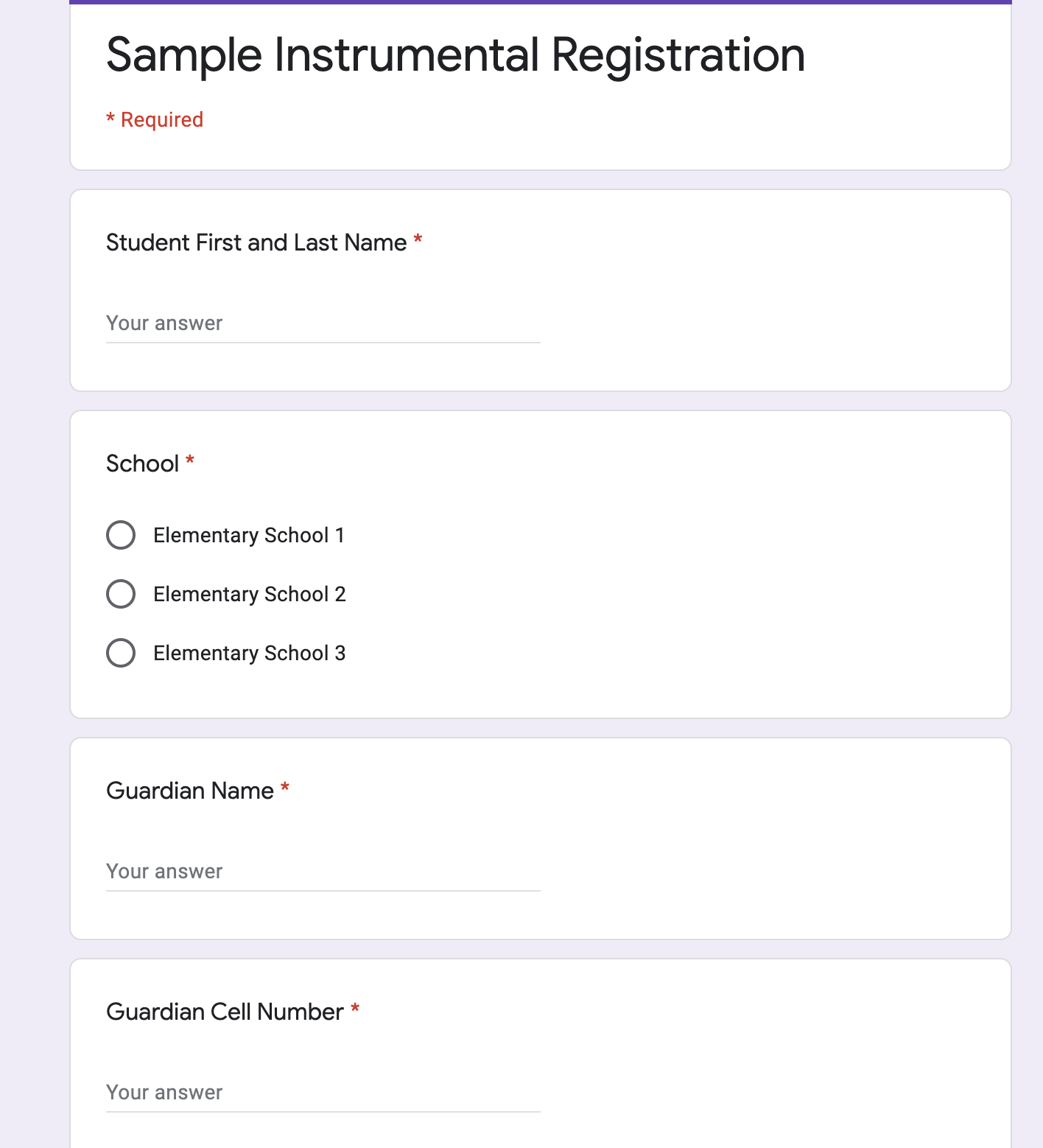
Sample Instrumental Registration Google Form

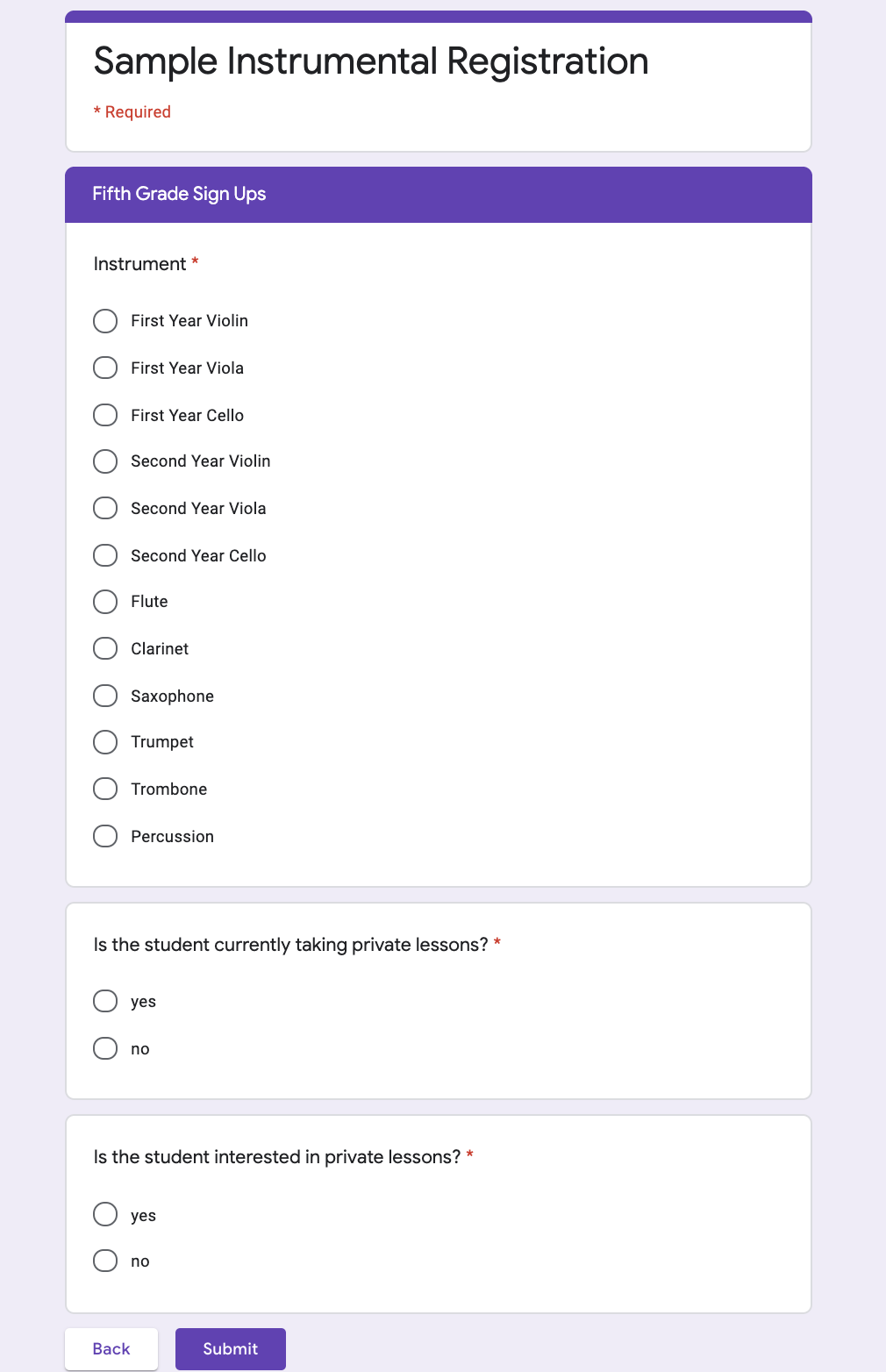
What’s great about using a Google Form for registration is that we can set conditions on what options are available by using sections within the Google Form. In this case, we ask for the student’s grade level on the first page. Depending on which answer is given, the person filling out the form is taken to a different set of questions. In this case, we list only the instruments available to be taken in that grade level on each page. Here’s the fourth grade page:
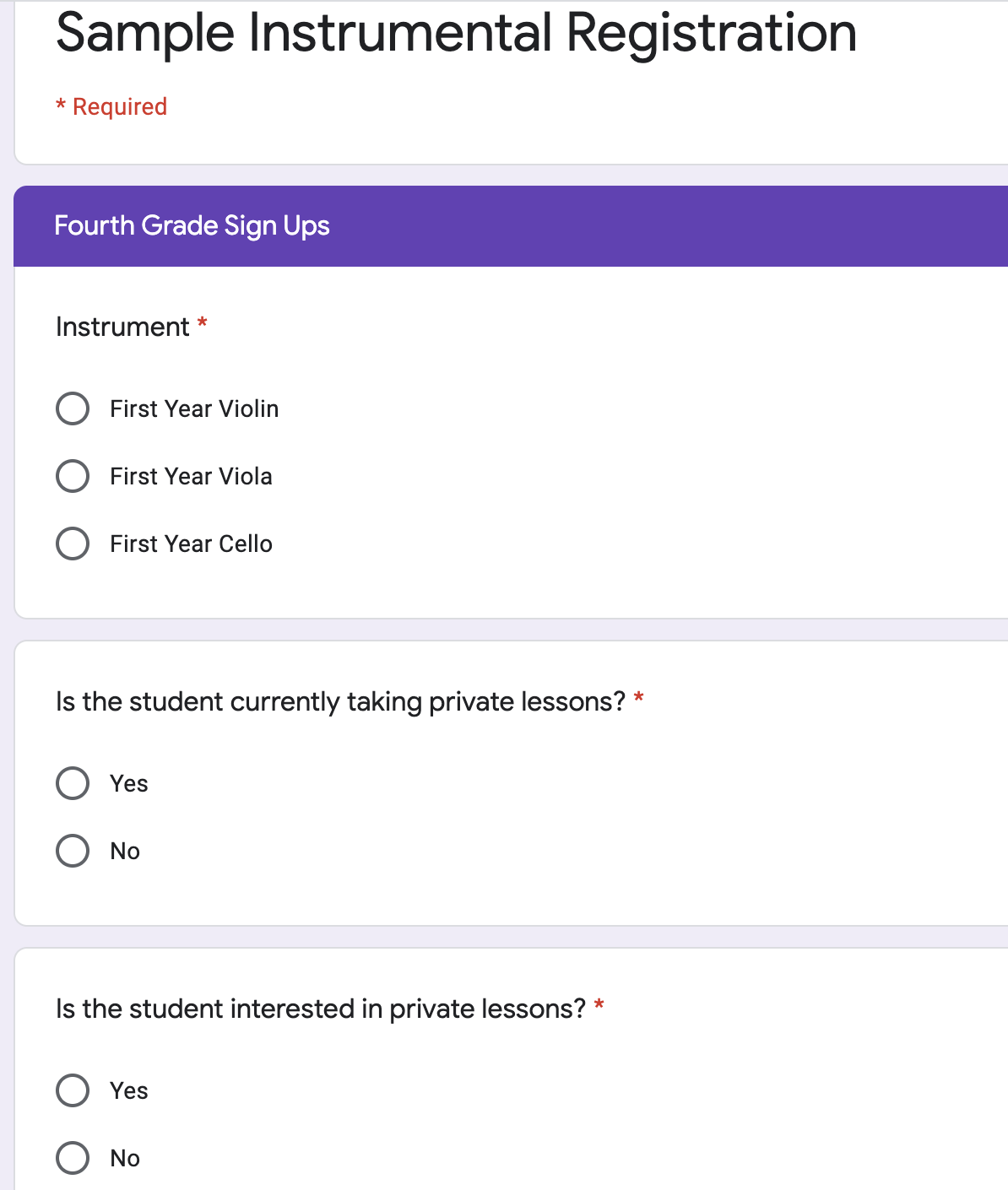
Sample Instrumental Registration Google Form 4th Grade

And here’s the fifth grade page:

Sample Instrumental Registration Google Form 5th Grade

We started using this option within Google Forms because of confusion in prior years of registration. Often, we’d have a student register for an instrument not available to their grade level, or have an incomplete paper form. Google Forms makes it clear what registration options are possible, and allows for all the information to be kept in one place.

A quick note about data privacy: check your school policies on student information. In my school, we can collect personal information about students, such as full names and phone numbers, only on our school-assigned Google for Education accounts. I wouldn’t be allowed to ask families to fill out the same form if I collected the information on my personal Gmail account. Make sure to follow any relevant privacy policies for your school setting.

With Google Forms, collecting registration information is easy. Additionally, organizing that information happens automatically. When looking at responses of a Google Form, click the Sheets button to automatically create a spreadsheet of the Form results. 

On this spreadsheet, you can sort, edit, and use conditional formatting to analyze the information. For example, when a student’s parents change their phone number. I can go into the linked spreadsheet and type in the new number without having to re-enter all of the student’s registration information. 

In my linked spreadsheet, we sort the registrations by the School column so that we can separate out registrations for each different school in the district. That way each teacher can cross-check registration forms with the school rosters, and can know who they will be teaching in a given class.

2. To check in on student wellness

I read about this idea on Twitter, and stumbled across Mari Venturino’s blog post on how she uses a Google form to check in on student’s well-being. Because Google Forms can be quick and allow Google Sheets to do the data analysis legwork, they allow teachers to obtain a pulse of their class very quickly. The Google Sheet can even be color-coded with conditional formatting so just a glance can show you what students might need support. With just three questions, the Google Form (available on Mari’s blog as a template to copy) can be a great way to build connections with students and foster their social-emotional health.

3. As an assessment

Google Forms are well-suited to assessment, whether it’s a quick exit ticket or a unit test. You can even make an automatically graded assessment using Google Forms’s Quizzes setting. Just click the Settings gear icon in the top right of the screen, and go to the Quizzes tab. 

Google Forms Settings

Once you toggle on ‘Make this a quiz”, various quiz options are available below. When you go back to the form, there will be a link with each question for the answer key, allowing you to select the correct answers. Even short answer questions can be automatically graded, allowing for students to type in a word or number to answer the question without the help of multiple-choice options. 

I love using the Add Image function when I’m making an assessment using a Google Form. It’s great for adding a picture of a musical symbol, or even an excerpt from sheet music. Just click the add image button next to a question to put in a picture of your choice. 
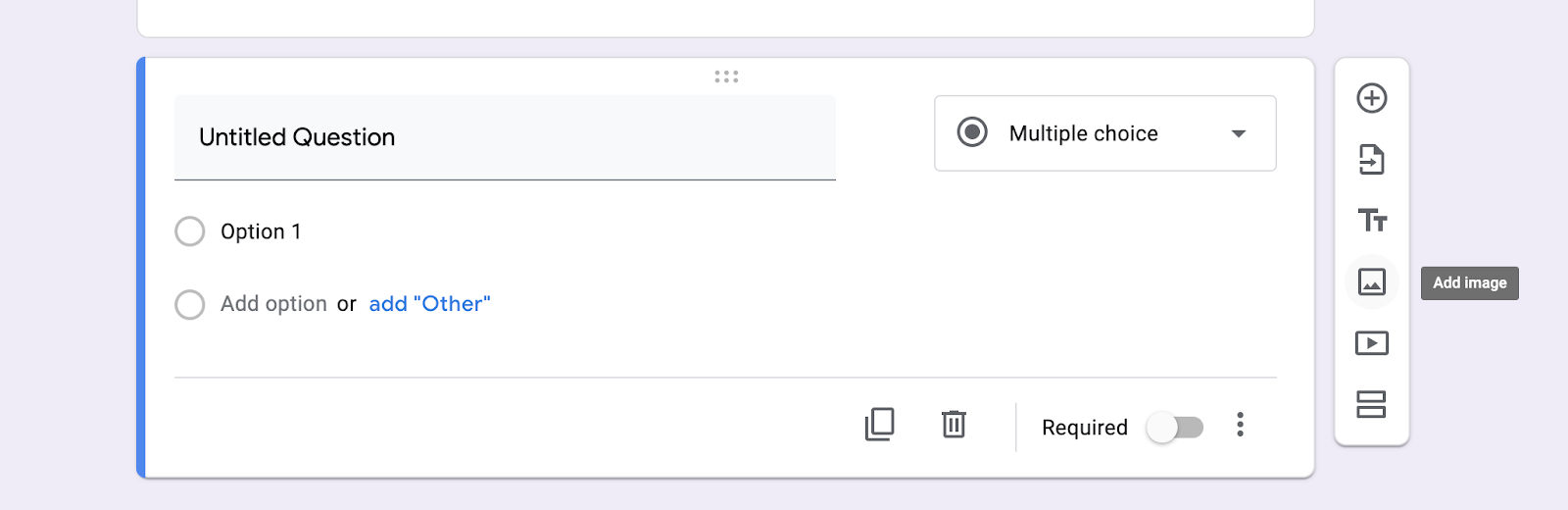
Google Forms Quiz

4. For an escape room

Escape rooms are fun, educational activities that encourage collaboration and creative thinking by students to solve content-based puzzles. Google Forms are a handy tool to collect the codes that lead to “breaking out” of an escape room, or winning the challenge. 

You can read more about how to set up an escape room for your students in the Midnight Music blog post Music Teachers: How To Set Up Your First Escape Room.

Save The Cookies Google Forms Escape Room

5. To let students vote from anywhere

Want an easy way for students to vote for band officers, a concert song, or a reward? Set up a quick Google Form and it’s easy! I always let my fifth graders vote for their final performance song of the year from a list. I can set up a quick 1 question Google Form to make voting easy:
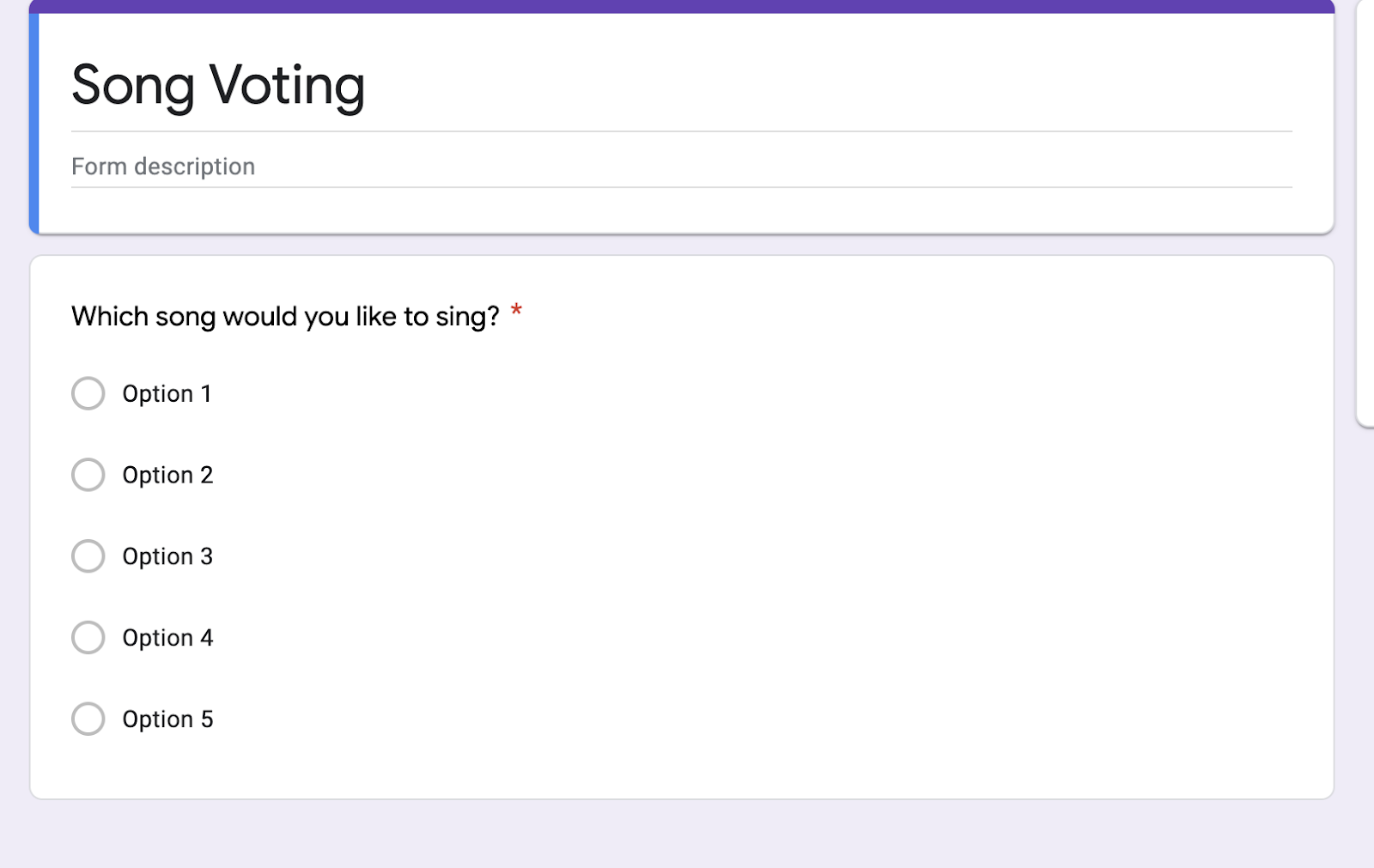
Google Forms Song Voting

Once students vote, I can even share the resulting chart with students. When I go to the responses tab, I can see a pie chart of the vote results
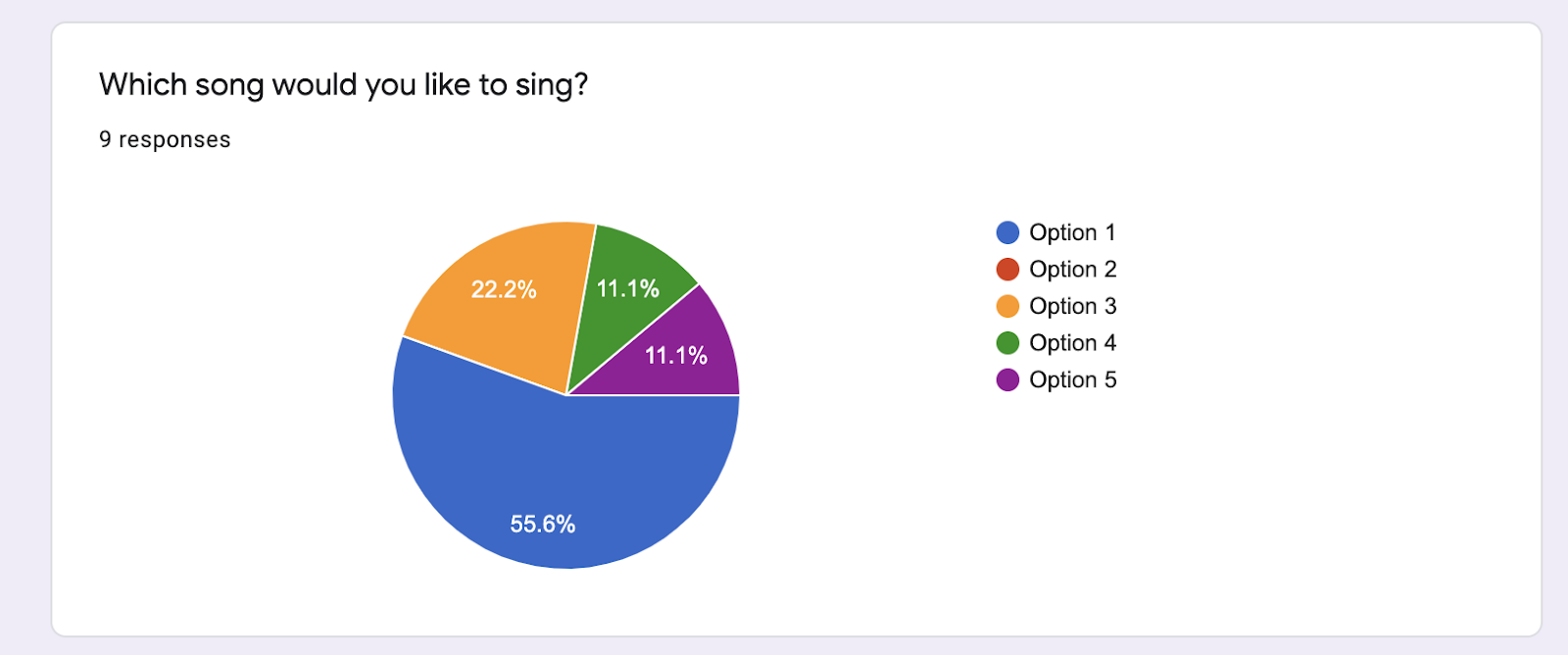
Google Forms voting results example

As you can see, in this sample poll Option 1 was the most popular choice. My students love to see the actual results like this, since it shows them how the group voted rather than me just telling them which song won.

Conclusion

As you can see, there’s many ways to use Google Forms in your classroom. This tool can also be powered up by integrating with other Google tools, such as Google Docs, Google Drive, and Google Classroom. You can even use Gmail to send out the link to a form! 

Google Forms are intuitive, simple, and versatile. Best of all, Google Forms is a free tool that teachers can use from any internet-connected computer, tablet, or smartphone. Try it out today, and I’m sure Google Forms will become one of your favorite tools for the classroom!

Download your copy

Would you like to take a copy of this with you? Click the button below and a copy of this will be sent directly into your inbox.

About the Writer

Sarah Joncas

Sarah Joncas is a music teacher from Massachusetts, USA. She teaches kindergarten through fifth grade general music, fifth grade chorus, fifth grade band, and percussion ensemble. Before becoming a teacher, she worked with technology and educational software.In 2014, she was named a TI:ME Technology in Music Education Leadership Fellow, which allowed her to attend a music education conference in Texas and explore cutting edge music teaching technology. She has earned degrees in Music Education from the University of Massachusetts Amherst and Boston University. You can connect with Sarah on Twitter or her blog Teaching Music Musings.

Want more help with creating beautiful teaching resources?

Be the first to join my brand new course…“Create Beautiful Teaching Resources, Fast” Online Course

Create Beautiful Teaching Resources, Fast is an online, self-paced course for teachers who want to create amazing resources for their classroom. 

In this course, you will go from feeling overwhelmed, time-poor and lacking ideas to feeling like a smart, savvy designer who can quickly make custom teaching resources that are worthy of selling on Teachers Pay Teachers.

The Waitlist will get first access to join the course PLUS a special bonus upon joining the program! Join the waitlist to get exclusive, priority access.
Create Beautiful Teaching Resources, Fast Online Course

Join the waitlist here!

0 Shares
Katie Argyle
Founder of Midnight Music

I’m Katie Argyle, founder of Midnight Music. I provide practical professional development that simplifies technology for music teachers, helping you teach with confidence and creativity using modern tools. I hold a Bachelor of Music (Education, Honours) from the University of Melbourne. With more than 15 years of experience, I’ve spoken at over 100 conferences and helped thousands of educators worldwide integrate technology into their teaching through my courses, workshops, and the Midnight Music Community.

Leave A Comment

You might also like...

Table of Contents

introducing the

MIDNIGHT MUSIC COMMUNITY

Your go-to hub for tech-focussed professional development: step-by-step training, online courses & creative lesson ideas especially for music teachers!

Desktop and laptop showing the 2025–2026 Ultimate Free Music Tech Resources Guide for teachers

download now!

THE ULTIMATE FREE MUSIC TECH RESOURCES GUIDE 2025-2026

Download our annual guide to 350+ of the best free tech resources, organized into 30 categories to help you supercharge your classroom.
It’s totally free. Get yours today.

Popular Courses

PRIVACY POLICY

This is the Privacy Policy for the Midnight Music website located at www.midnightmusic.com (“Site”).

The Site is operated by Midnight Music Pty Ltd ABN 87 619 652 603 (“Midnight Music” or “Company” or “we” or “us”).

Midnight Music understands the importance of protecting your personal information and undertakes to adhere to this privacy policy at all times to ensure your personal information is effectively safeguarded.

Information you provide to us

The Site provides various places for users to provide information. We collect information that users provide by filling out forms on the Site, communicating with us via contact forms, responding to surveys, search queries on our search feature, providing comments or other feedback, providing information when ordering a product or service via the Site, and other circumstances where collecting personal information is reasonable and permitted by the Laws of the State of Victoria, Australia.

We use information you provide to us to deliver the requested product and/or service, to improve our overall performance, and to provide you with offers, promotions, and information.

Information we collect through automatic data collection technology

As you navigate through the Site, we may use automatic data collection technologies including Google Analytics to collect certain information about your equipment, browsing actions, and patterns. This will generally include information about your location, your traffic pattern through our Site, and any communications between your computer and our Site. Among other things, we will collect data about the type of computer you use, your Internet connection, your IP address, your operating system, and your browser type.

The information we collect automatically is used for statistical data and will not include personal information. We use this data to improve our Site and our service offerings. To the extent that you voluntarily provide personal information to us, our systems will associate the automatically collected information with your personal information.

Use of cookies and pixels

Similar to other commercial websites, our Site utilises a standard technology called “cookies” and server logs to collect information about how our site is used. Information gathered through cookies and server logs may include the date and time of visits, the pages viewed, time spent at our site, and the websites visited just before and just after our own, as well as your IP address.

A cookie is a very small text document, which often includes an anonymous unique identifier. When you visit a website, that site’s computer asks your computer for permission to store this file in a part of your hard drive specifically designated for cookies. Each website can send its own cookie to your browser if your browser’s preferences allow it, but (to protect your privacy) your browser only permits a website to access the cookies it has already sent to you, not the cookies sent to you by other sites.

The Company reserves the right to use technological equivalents of cookies, including social media pixels. These pixels allow social media sites to track visitors to outside websites so as to tailor advertising messages users see while visiting that social media website. The Company reserves the right to use these pixels in compliance with the policies of the various social media sites.

Use of SMS

We collect mobile phone numbers to send SMS messages. By providing your mobile number, you consent to receive SMS communications from us regarding our products, services, and promotions. We will not share your mobile number with third parties. Message frequency may vary based on your interaction with us. Message and data rates may apply. You can opt-out of receiving SMS messages at any time by following the instructions provided in the message or by contacting us directly.

How we manage personal information

Midnight Music undertakes to take all commercially reasonable steps to ensure that all personal information collected by us is accurate, up-to-date, complete and stored securely. When your personal information is no longer required for the purposes which Midnight Music uses personal information, all commercially reasonable steps will be undertaken to securely destroy that information.

How your personal information will be used

We use personal information for purposes of presenting our Site and its contents to you, providing you with information, providing you with offers for products and services, providing you with information about your subscriptions and products, carrying out any contract between you and the Company, administering our business activities, providing customer service, and making available other items and services to our customers and prospective customers.
From time-to-time, we may use the information you provide to us to make you offers to purchase products and services provided by third parties in exchange for a commission to be paid to us by such third parties. Should you opt to take part in such promotions, the third parties will receive your information.

Disclosure of your information

Midnight Music considers personal information we collect about you to be confidential and will not disclose such information to third parties except in the following circumstances:

  • Where you have consented to your personal information being provided to a third party;
  • Where Midnight Music is required by law to disclose your information; and
  • Gaining access to your personal information held by Midnight Music

Except in circumstances where access to your personal information may be denied by the Privacy Act or other Law of the State of Victoria, Australia, your personal information will be provided to you upon request.

Visitors’ General Data Protection Regulation rights

If you are within the European Union, you are entitled to certain information and have certain rights under the General Data Protection Regulation (GDPR). These include the following:

  • We will retain the any information you choose to provide to us until: (a) you ask us to delete the information; (b) we decide to cease using our existing data providers; or (c) the Company decides that the value in retaining the data is outweighed by the costs of retaining it.
  • You have the right to request access to your data that the Company stores and the rights to either rectify or erase your personal data.
  • You have the right to seek restrictions on the processing of your data.
  • You have the right to object to the processing of your data and the right to the portability of your data.
  • To the extent that you provided consent to the Company’s processing of your personal data, you have the right to withdraw that consent at any time, without affecting the lawfulness of processing based upon consent that occurred prior to your withdrawal of consent.
  • You have the right to lodge a complaint with a supervisory authority that has jurisdiction over issues related to the General Data Protection Regulation.
  • We require only the information that is reasonably required to enter into a contract with you. We will not require you to provide consent for any unnecessary processing as a condition of entering into a contract with us.

Contact us

Should you have any queries in relation to the above or require further information regarding the Privacy Policy please contact us:

Midnight Music Pty Ltd
PO Box 219
Glen Waverley
Victoria 3150
AUSTRALIA

Email address: support@midnightmusic.com