

This is a guest post by one of our teacher-authors, Katherine Miller.
Concert season has arrived! Many schools and programs are beginning to rebuild traditions that were put on hiatus when live concerts were not possible over the last school year or even years in some cases. Honoring traditions and bringing live music back into the lives of our students and families is very important but it also might be a great time to start some new traditions starting with concert programs!
Canva, my favorite online design and publishing tool, can help make the creation of your concert program a breeze. By utilizing one of the many program templates, the design decisions can be left to the professionals and you can spend your time personalizing the template you like best to your students and ensemble.
Canva can also help save the time that you might have traditionally spent next to the copy machine printing all of your programs (and, don’t forget, folding them) by creating a QR code that audience members can use to access the program.
This small change in tradition can save you a ton of time and still makes it possible to have beautiful programs to remember these events that we have waited a long time to enjoy again!
Here are the easy steps you can take to try it out.
Find a Music Program Template on the Canva Website
There are tons of options that you can find by using the search box and narrowing your search choices using the left hand navigation bar by category (programs), style, theme or colors that you would like to include. You can also start with a blank program template and build each of these elements exactly to your taste.
Here are three program templates that are simple and easy to use if you are just getting started with Canva:
- Minimalist Concert Program
- Illustrations Concert Program
- Retro Concert Program
- Graduation Themed Program
- Colorful Elementary Program
Make it your own!
Once you find a template you like (or have decided to create your own), you can make any changes necessary to fit your ensemble.
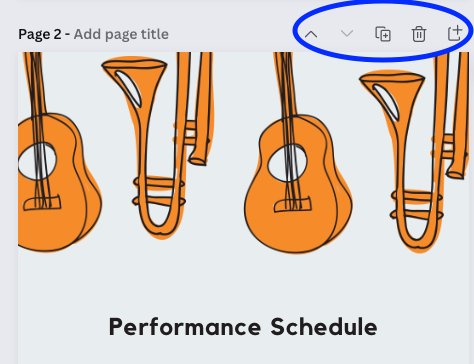
You can easily add more pages, reorder pages, duplicate pages of the template, or add another one using the menu at the top of each page.
How to Make a Table
You also have all of the other amazing features that Canva offers available to you including the newer tables feature. You could use a table to easily organize student names, instrumentation or thank you’s.
Simply add a table of your choice to your design by searching for “Table” in the ‘Elements’ window. Next, add columns and rows by clicking on the 3 dots OR by right-clicking on the table.
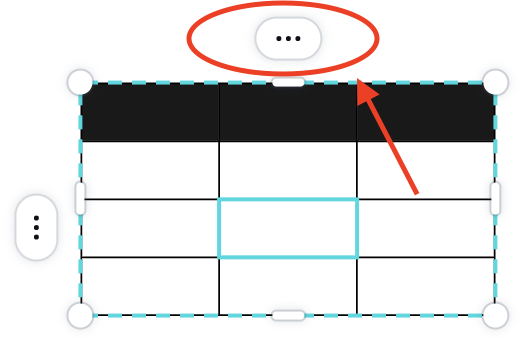
Once your table is created, type into the cells by double-clicking. Once you have added your information to each cell, you can also recolor the gridlines of the table to make them disappear!
All the audience will see is nicely organized information. You will know how easy it was to make!

Turn Your Physical Program into a Digital Program with a QR Code
Once your program is complete, you will need to begin another Canva project to create a poster to display your QR code. Here is an example of one that I created that you can access and customize for your own use: QR Code Poster Template.
How to Create a QR Code Inside Canva
- Click “More” in the left hand navigation toolbar in the poster template
- Choose QR code
- Paste the “view only” link from your concert program project in the text box

- Press “Generate code”
- Resize and move the code where you would like it on the page.
- Display for the audience to scan!

Tip: It might also be helpful to display a shortened link, or shortened URL, along with your QR code in case someone does not have access to a camera on their device. You can create a shortened URL by signing up for a free plan through Bitly at https://bitly.com/ (which will allow you to make 50 short URL links/month).
Displaying Your QR Code
There are quite a few options for displaying your QR code depending on what you have available at your performance location.
- You could print off the QR to hang it up or display it on a music stand where audience members will enter.
- You could also project the QR code if you are planning on using other multimedia during your performance.
- You could even create small business cards or stickers to hand out in order for the QR code to be able to leave the venue at the end of the performance.
Final Thoughts
I hope you’ve enjoyed learning about how easy and fun it is to create digital and physical concert programs in Canva!
Have you tried using virtual programs in the past?
How did audience members like it?
More Blogs About Canva from Midnight Music
- Canva Video Tools: A Quick-Start Guide for Teachers
- 10 Canva Templates for the Music Classroom
- 9 Exciting Canva Updates for Teachers
- How to Design Your Classroom Theme in Canva
- 5 MORE Cool Canva Tricks for Designing Teacher Resources
- How to Use Canva to Merge Technology Standards and Content Standards
- Our Top 10 Keyboard Shortcuts for Canva for Teachers
Download your copy
Would you like to take a copy of this with you? Click the button below and a copy of this will be sent directly into your inbox.
About Katherine Miller

Katherine (Katie) Miller holds a Bachelor of Music in Education degree from Otterbein University (Westerville, OH) and a Masters of Educational Leadership from Antioch McGregor Midwest (Yellow Springs, OH). She has 15 years of professional musical experience as a music educator and performer.
She resides in the Milwaukee, Wisconsin area where she teaches K-5 General Music and serves as a district model tech classroom. She was recognized in 2018 as a WPT Education Innovator by the Wisconsin Public Television Education team. Twitter: K8TMiller
Looking for More Resources for Music Teachers?
Hello! I’m Katie Argyle – an Australian music technology trainer and consultant with a passion for helping music teachers through my business Midnight Music.
I’m a qualified teacher but no, I don’t currently teach in a school. I help teachers through my online professional development space – the Midnight Music Community – where there are tutorial videos, courses, links and downloadable resources.

I like to focus on easy ways to incorporate technology into what you are already doing in your music curriculum through a range of creative projects. I also run live workshops and have presented at countless conferences and other music education events.
If you want simple, effective ideas for using technology in music education, I would LOVE to help you inside the Midnight Music Community.




2 Comments
How do you recolor the grid lines?
[…] how to make digital & physical concert programs in Canva […]