Written by Katrina Proctor, Content Manager at Midnight Music
Have you ever wondered how the integration of tech advancements could make your music classroom more dynamic and captivating? Or perhaps you’ve considered the role of artificial intelligence in music education? If so, you’re in the right place!
The educational landscape is constantly being reshaped by technology, and as music educators, it’s time we embrace some of these fun changes. Today, let’s explore some incredible developments from an online platform you may already be acquainted with – Canva.

What is Canva?
Canva is an online design studio that music teachers can use to create their own worksheets, presentations, videos, websites, concert programs, classroom posters and so much more! Canva offers a free account for all educators in their platform, Canva for Education. Inside you’ll find hundreds of free templates, thousands of free clip art images, free videos, free fonts and more!
Canva, while expansive and impressive, does take some time to learn. To help get you started, check out Midnight Music’s Create Beautiful Teaching Resources with Canva course where you’ll learn all of the basics of design and resource creation plus tons of more advanced tools and updated projects to do with and without students.
Canva AI Tools
Canva has revolutionized teaching for many, making design approachable and accessible to even the most beginners. But did you know in the last year, they’ve incorporated AI technology into their platform? That’s right! Canva is now harnessing the power of AI. Let’s dive into their latest suite of tools called, ‘Magic Studio.’ There are 11 tools in the Magic Studio, but in this blog, we’ll be showcasing three of the most impressive new Canva AI tools: Magic Design, Magic Switch, and Magic Media.
1. Magic Design
Imagine an assistant that helps transform your ideas into polished designs. That’s exactly what Magic Design offers! It’s easy to create attractive concert programs or captivating visual aids for your music classes in just a few clicks. With Magic Design, you can just describe the content you’re creating and Canva will create a pre-designed template with an outline and even some content (always check AI content for factual accuracy!).
How Magic Design Works
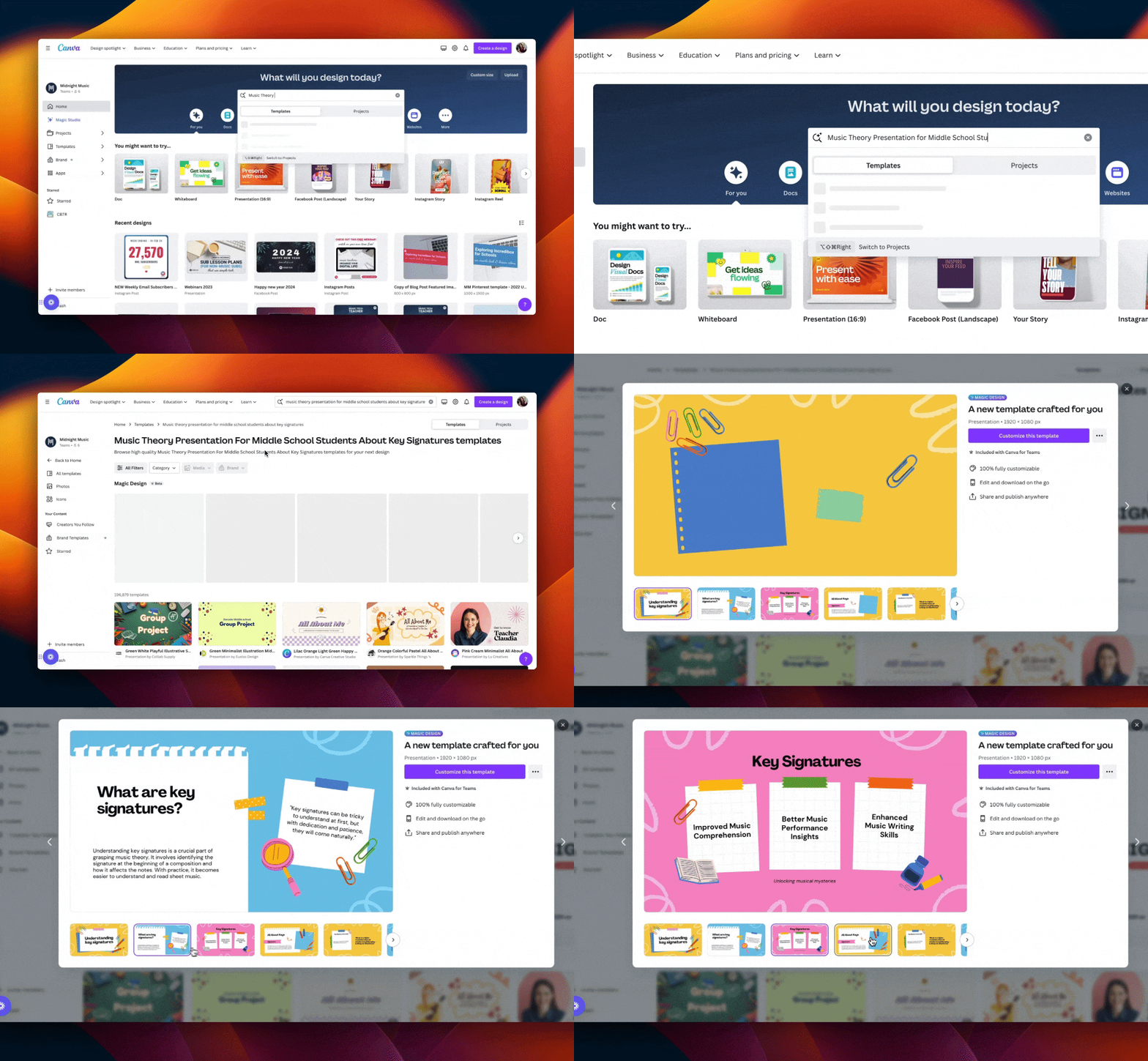
- Simply enter your specific piece of content into the Canva search bar.
- In our example, we searched for ‘Music Theory Presentation for Middle School Students about Key Signatures’
- Choose a design under the heading, ‘Magic Design’
- Preview your design
- Edit and correct the pre-created content
2. Magic Switch
Ever wished for a tool to change the look of your design without starting over? That’s where Magic Switch comes in. It allows you to transform your design while retaining the content (ex. A photo to a document, or a video to a social media post). You can even use Magic Switch to translate your materials to different languages (just make sure to check for accuracy)! This tool can be a lifesaver when you want to refresh your lesson materials or adapt existing resources for different classes or purposes – a real time-saver!
How Magic Switch Works
Translate:
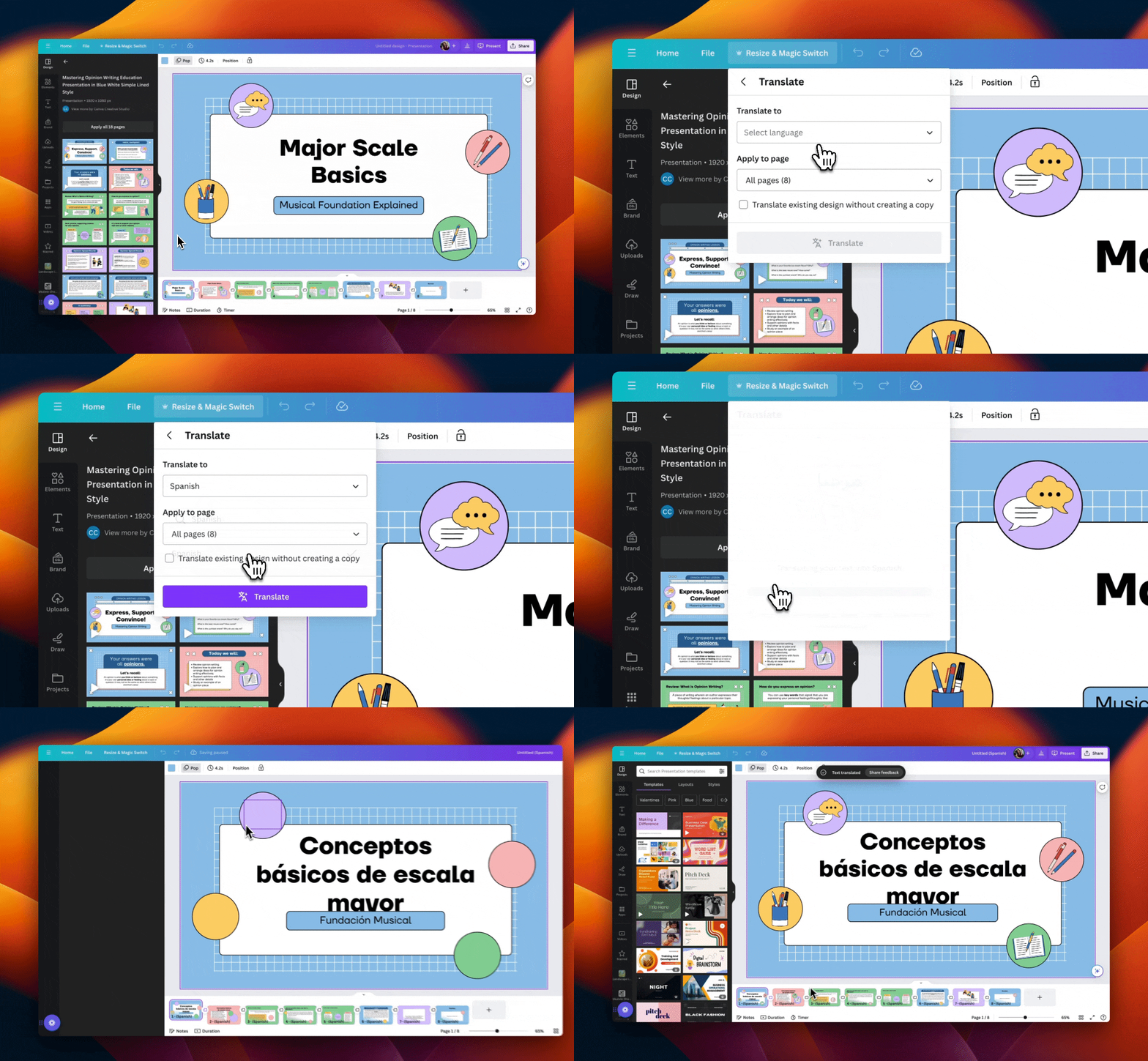
- Inside of a design, click the ‘Resize & Magic Switch’ Button
- Select ‘Translate’
- Choose your output language and whether you’d like to make a copy or replace the original
- Check your output for accuracy
Transform:
- Inside of any design, click the ‘Resize & Magic Switch’ Button
- Select ‘Transform into Doc’ or select a new size or format from the dropdown
- View and edit your revised document or resized image.
3. Magic Media
Magic Media is an AI-powered feature that generates relevant images and videos based on your text.
Say goodbye to endless searching for the perfect image to match your lesson topic. With Magic Media, you can create dynamic visual resources that resonate with your students and enhance their learning experience.
How Magic Media Works
- From inside any Canva design, select ‘Magic Media’ from the left tool panel.
- Choose whether to create an image or a video
- Write a description for the image or video you want to create
- Tip: More generic words work better than specific terms at this time. Images and videos of things like specific instruments, music notes/symbols or people often don’t generate well. Try it yourself!
Final Thoughts
In conclusion, the Canva AI tools offer endless opportunities to enrich your music classroom, and the best part is the tools are always improving and getting better and more intuitive! These new Canva AI tools not only save time and effort but also help in creating engaging, dynamic, and visually appealing resources. Give these tools a try and experience the power of AI in your music classroom!
And remember, you’re not alone on this journey! We’re here to support you every step of the way. If you’re just getting started on your Canva journey, we’d love to have you come join us in the Create Beautiful Teaching Resources with Canva Course and if you have questions, get individual advice for all of your Canva (and any other music tech) questions inside the Midnight Music Community!
About the author

Katrina Proctor is the Content Manager at Midnight Music and is also a former music teacher from Colorado, USA. She taught middle school music for nearly 10 years in northern Colorado, where her passion is low-income students in Title 1 schools. Katrina has taught 5th-8th grade chorus, advanced-level chorus, class piano, general music, band, and orchestra. She has her Bachelor’s Degree in Music Education & Master’s Degree in Music Education-Choral Conducting from the University of Colorado at Boulder. You can connect with Katrina on Facebook or via her website, She The Teacher.
Want more resources for music tech teachers?
Hello! I’m Katie Argyle – an Australian music technology trainer and consultant with a passion for helping music teachers through my business Midnight Music.
I’m a qualified teacher but no, I don’t currently teach in a school. I help teachers through my online professional development space – the Midnight Music Community– where there are tutorial videos, courses, links and downloadable resources.

I like to focus on easy ways to incorporate technology into what you are already doing in your music curriculum through a range of creative projects. I also run live workshops and have presented at countless conferences and other music education events.
If you want simple, effective ideas for using technology in music education, I would LOVE to help you inside the Midnight Music Community.